EventMap Window
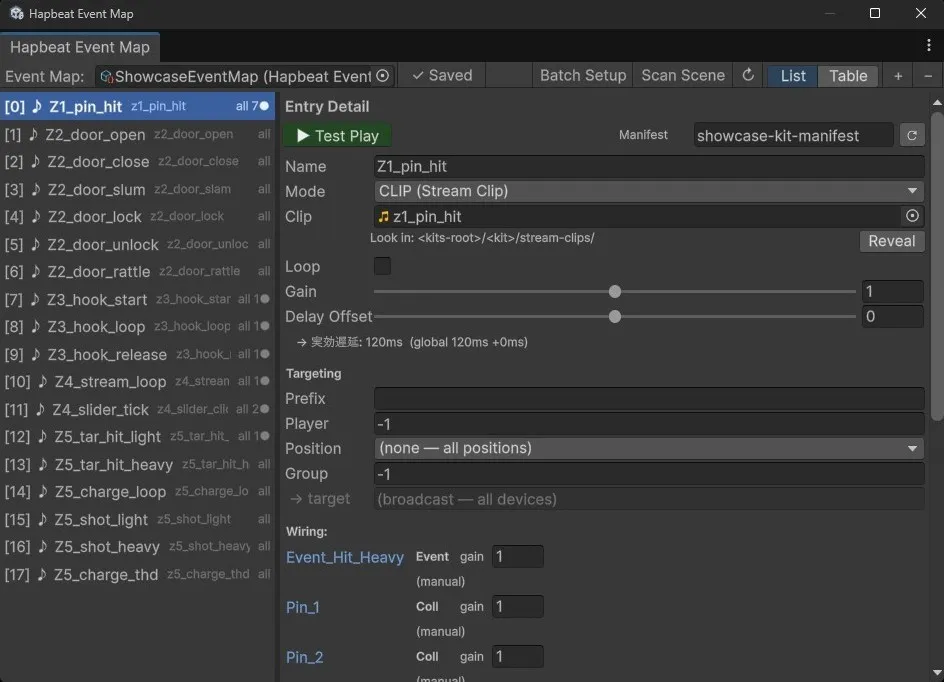
EventMap is a ScriptableObject + dedicated Editor window that centrally manages the mapping between Event IDs and haptic entries. Triggers, StateBehaviours, and scripts all reference EventMap entries, which serve as the single source of truth for mode, gain, target, bindings, and other settings.
This page is a comprehensive reference for advanced users and AI tooling — prioritizing completeness over readability. For task-oriented usage, see Integrating into Your Project and Parameter Binding.
1. Overall Structure
Section titled “1. Overall Structure”HapbeatEventMap (ScriptableObject; .asset)├─ entries : List<HapbeatEventEntry>└─ revertPlayModeChanges : bool
HapbeatEventEntry├─ _id (stable GUID, lazy-assigned)├─ mode (Command / StreamClip)├─ displayName / category / eventName (→ eventId = "category.eventName")├─ streamClip / loop (StreamClip mode)├─ bindings : List<HapbeatBindingPreset> (StreamClip mode)├─ gain├─ target├─ delayOffsetSeconds├─ notes├─ manifestOverride└─ _cachedManifestIntensity (HideInInspector)
HapbeatBindingPreset (element of entry.bindings)├─ _id (stable GUID)├─ ownerObjectName├─ sourceTransformPath├─ sourceProperty, inputMin/Max├─ curveType, customCurve├─ outputParameter, outputMin/Max└─ debugLog, debugLogInterval, debugLogChangeThresholdInter-entry references use stable GUIDs (_id), so trigger wiring is preserved even when entries are reordered, inserted, deleted, or duplicated. _id is lazy-assigned on first access via the .id getter. The Editor proactively assigns IDs at window startup (EnsureEntryIdsAssigned) and when entries are added.
2. HapbeatEventMap (Asset)
Section titled “2. HapbeatEventMap (Asset)”| Field | Type | Description |
|---|---|---|
entries | List<HapbeatEventEntry> | The list of entries. Order affects display only and does not affect wiring |
revertPlayModeChanges | bool | If true, automatically reverts EventMap changes made during Play mode on exit (for non-destructive tuning) |
Asset Creation
Section titled “Asset Creation”| Menu | Behavior |
|---|---|
Assets → Create → Hapbeat → Event Map | Creates an asset directly under the right-clicked folder |
Hapbeat → Create Event Map | Creates at Assets/HapbeatSDK/EventMaps/<scene-name>-EventMap.asset |
Hapbeat → Initial Scene Setup | Creates Router GameObject + asset + opens the window all at once |
The .asset can be placed anywhere, but HapbeatSDK/EventMaps/ is recommended. Initial Scene Setup incorporates the active scene name into the asset file name (<scene>-EventMap.asset).
Public API (HapbeatEventMap class)
Section titled “Public API (HapbeatEventMap class)”| Method | Returns | Purpose |
|---|---|---|
GetEntry(int index) | HapbeatEventEntry? | List-index based (legacy; index is unstable — not recommended) |
FindById(string id) | HapbeatEventEntry? | Stable GUID lookup (recommended). Used by Triggers |
IndexOfId(string id) | int | GUID → list index (-1 if not found) |
FindByName(string displayName) | HapbeatEventEntry? | Exact match on displayName |
FindByEventId(string eventId) | HapbeatEventEntry? | Exact match on category.eventName |
GetDisplayNames() | string[] | For editor dropdowns. Each line in [index] icon displayName format |
3. HapbeatEventEntry — All Fields
Section titled “3. HapbeatEventEntry — All Fields”3.1 Identifiers
Section titled “3.1 Identifiers”| Field | Type | Default | Description |
|---|---|---|---|
_id | string (HideInInspector) | "" → lazy GUID | Stable identifier. Resilient to reorder/insert. Triggers store this via _entryId |
HasId (getter) | bool | — | Whether the .id getter can be evaluated without side effects |
RegenerateId() | — | — | Force-regenerates the ID. Used on Duplicate |
3.2 Mode
Section titled “3.2 Mode”| Field | Type | Default | Description |
|---|---|---|---|
mode | HapticMode enum | Command | Command (plays a device-local Kit clip by ID) / StreamClip (sends PCM via UDP) |
UI display labels (s_ModeLabels):
FIRE (Command)CLIP (Stream Clip)
The legacy LIVE (stream_source) mode has been removed. Enum names remain Command / StreamClip for API compatibility.
HapticMode.GetModeIcon() Output
Section titled “HapticMode.GetModeIcon() Output”| Mode | Icon (1 char) | Notes |
|---|---|---|
Command | > | FIRE |
StreamClip | ♪ (U+266A) | CLIP |
| (fallback) | ● (U+25CF) | For unknown enum values |
3.3 Identity / Display
Section titled “3.3 Identity / Display”| Field | Type | Purpose |
|---|---|---|
displayName | string | Editor display label (e.g. “Landing Impact”) |
category | string | First segment of the event-id. Segment format: ^[a-z][a-z0-9_-]{0,63}$ |
eventName | string | Second segment. Same format |
eventId (computed) | string | "{category}.{eventName}". If category is empty, returns eventName only; if eventName is empty, returns "" |
IsValidSegment(segment): Validates against ^[a-z][a-z0-9_-]{0,63}$.
IsValid(): Both category and eventName are valid segments.
3.4 StreamClip Mode Only
Section titled “3.4 StreamClip Mode Only”| Field | Type | Default | Description |
|---|---|---|---|
streamClip | AudioClip | null | PCM16 source sent via UDP. Recommended location: HapbeatSDK/Kits/<kit>/stream-clips/ |
loop | bool | false | If true, plays until Stop() is called. For SequenceTrigger hold phase / continuous modulation |
bindings | List<HapbeatBindingPreset> | empty | List of registered Parameter Binding presets |
When streamClip changes, the owning Kit’s *-manifest.json is auto-attached to manifestOverride (and _cachedManifestIntensity for that entry is refreshed).
3.5 Gain
Section titled “3.5 Gain”| Field | Type | Range | Description |
|---|---|---|---|
gain | float | [0, 2] (Range attribute) | Master gain. GetEffectiveGain() = gain × _cachedManifestIntensity |
3.6 Targeting
Section titled “3.6 Targeting”| Field | Type | Example |
|---|---|---|
target | string | "" (all devices) / player_1 / */pos_neck / player_1/pos_chest / team_red/player_1/pos_chest/group_3 |
HasTarget (getter): !string.IsNullOrEmpty(target).
StandardPositions Constants
Section titled “StandardPositions Constants”12 body positions conforming to the contracts device-addressing spec:
pos_neck, pos_chest, pos_abd,pos_l_arm, pos_r_arm, pos_l_wrist, pos_r_wrist,pos_hip, pos_l_thigh, pos_r_thigh, pos_l_ankle, pos_r_ankleCorresponding PositionLabels:
Neck, Chest, Abdomen,Left Arm, Right Arm, Left Wrist, Right Wrist,Hip, Left Thigh, Right Thigh, Left Ankle, Right AnkleBuildTarget(int player = -1, string position = null)
Section titled “BuildTarget(int player = -1, string position = null)”Static helper to construct a target string:
| player | position | Returns |
|---|---|---|
> 0 | non-empty | player_<N>/<position> |
> 0 | null/empty | player_<N> |
-1 | non-empty | */<position> |
-1 | null/empty | "" (all devices) |
The window UI also supports adding a Prefix (e.g. team_red) and Group (group_<N> suffix) to build a 4-segment target string (prefix/player_N/position/group_N).
3.7 Latency Offset
Section titled “3.7 Latency Offset”| Field | Type | Range | Description |
|---|---|---|---|
delayOffsetSeconds | float | [-0.2, 0.2] (Range) | Per-entry offset. Added to the global value (HapbeatConfig.hapticDelaySeconds); actual delay is max(0, global + offset) |
The effective delay is displayed in milliseconds in the UI.
3.8 Notes / Metadata
Section titled “3.8 Notes / Metadata”| Field | Type | Description |
|---|---|---|
notes | string (TextArea, 1–3 lines) | Designer notes. Not sent to the device |
manifestOverride | TextAsset | Forces a specific <kit-name>-manifest.json to be used. If unset, auto-resolved (by clip path → eventId match) |
_cachedManifestIntensity | float (HideInInspector) | Cached intensity value resolved from the manifest. -1f = unresolved, 0..1 = authored value |
CachedManifestIntensity (getter): Read-only accessor.
SetCachedManifestIntensity(float): Editor-only setter (used for cache propagation on duplicate, etc.).
3.9 Derived Methods
Section titled “3.9 Derived Methods”| Method | Returns | Description |
|---|---|---|
GetEffectiveGain() | float | _cachedManifestIntensity < 0 ? gain : gain × _cachedManifestIntensity. intensity=0 is honored (silence) |
GetSummary() | string | Summary for list display. StreamClip → streamClip.name, Command → eventId |
GetModeIcon() | string | > / ♪ / ● |
4. HapbeatBindingPreset — All Fields
Section titled “4. HapbeatBindingPreset — All Fields”An element of HapbeatEventEntry.bindings. A preset for modulating gain / pan during StreamClip playback.
| Field | Type | Default | Description |
|---|---|---|---|
_id | string (HideInInspector) | "" → lazy GUID | Stable identifier. Referenced by HapbeatParameterBinding._linkedBindingId at runtime |
ownerObjectName | string | "" | Binding scope. Empty = shared (applied to all wired GameObjects) / non-empty = applied only to the specified GameObject name |
sourceTransformPath | string | "" | Relative path from the trigger root. Empty or . = the trigger itself |
sourceProperty | BindingSourceProperty enum | LocalPositionY | Input source type |
inputMin | float | 0 | Lower bound of input range → maps to outputMin |
inputMax | float | 1 | Upper bound of input range → maps to outputMax |
curveType | BindingCurveType enum | Linear | Curve applied after normalization |
customCurve | AnimationCurve | Linear(0,0)-(1,1) | Used when curveType=Custom |
outputParameter | BindingOutputParameter enum | StreamGain | Target parameter to modulate |
outputMin | float | 0 | Lower bound of output |
outputMax | float | 1 | Upper bound of output |
debugLog | bool | false | Enable/disable per-frame debug logging |
debugLogInterval | float | 0.1 | Log throttle (seconds) |
debugLogChangeThreshold | float | 0.02 | Log is skipped if the normalized value has not changed by at least this amount |
4.1 BindingSourceProperty (10 values)
Section titled “4.1 BindingSourceProperty (10 values)”| Value | Input | Required ref |
|---|---|---|
LocalPositionX / Y / Z | _sourceTransform.localPosition.{x,y,z} | _sourceTransform |
LocalScaleX / Y / Z | _sourceTransform.localScale.{x,y,z} | _sourceTransform |
VelocityMagnitude | Rigidbody.linearVelocity.magnitude (Unity 6+) or .velocity.magnitude | Rigidbody on _sourceTransform |
AngularVelocityMagnitude | Rigidbody.angularVelocity.magnitude | Same |
PositionDeltaMagnitude | (pos - prevPos).magnitude / Time.deltaTime. For kinematic / XRGrab | _sourceTransform |
SliderValue | Slider.value | _sourceSlider |
External | External push via binding.SetValue(v) | None |
4.2 BindingCurveType (5 values)
Section titled “4.2 BindingCurveType (5 values)”| Value | Formula |
|---|---|
Linear | t |
EaseIn | t² |
EaseOut | 1 - (1-t)² |
Exponential | (e^(3t) - 1) / (e^3 - 1) |
Custom | customCurve.Evaluate(t) |
4.3 BindingOutputParameter (2 values)
Section titled “4.3 BindingOutputParameter (2 values)”| Value | Range | Effect |
|---|---|---|
StreamGain | 0..2 (clamped) | playback.ApplyGainModulation(output). Final stage of entry.gain × manifest.intensity × bindingOutput |
StreamPan | -1..+1 | playback.Pan = output. Equal-power pan law. Ignored for mono clips |
5. EventMap Window
Section titled “5. EventMap Window”5.1 Opening
Section titled “5.1 Opening”- Menu:
Hapbeat → Open Event Map(former SDK menu name:Hapbeat → Event Map) - Internal class:
HapbeatEventMapWindow : EditorWindow - Minimum size: 500 × 300
- Tab title:
Hapbeat Event Map(unsaved changes show a trailing*)
5.2 Persistent Settings (EditorPrefs)
Section titled “5.2 Persistent Settings (EditorPrefs)”| Key | Content |
|---|---|
HapbeatEventMap_SelectedGUID | GUID of the most recently selected EventMap asset |
HapbeatEventMap_SplitRatio | Left/right pane split ratio for List view (0.2 .. 0.8, default 0.42) |
HapbeatEventMap_ViewMode | 0 = List / 1 = Table |
5.3 Auto-save / Dirty State
Section titled “5.3 Auto-save / Dirty State”EditorUtility.SetDirty+AssetDatabase.SaveAssetIfDirtyis called after each edit- Also saves on
OnLostFocus/OnDisable(to prevent edits from being lost on domain reload or Unity exit) - The toolbar shows a
● Save(orange) /✓ Savedindicator
5.4 Toolbar
Section titled “5.4 Toolbar”Left to right:
| Element | Function |
|---|---|
Event Map: Object Field | Switch the EventMap being edited (persisted by GUID) |
● Save / ✓ Saved | Dirty state indicator and manual save button |
| (FlexibleSpace) | |
Batch Setup | Open HapbeatBatchSetupWindow |
Scan Scene | Re-scan Trigger / State / Script wiring in the scene |
↻ | Refresh manifest intensity cache for all entries |
List / Table (segmented) | Switch view mode |
+ | Add a new entry (inherits mode from the previous entry) |
− | Delete the selected entry |
5.5 Keyboard Shortcuts
Section titled “5.5 Keyboard Shortcuts”| Key | Action |
|---|---|
↑ / ↓ | Move selection |
Esc | Cancel an in-progress drag-reorder |
6. List View
Section titled “6. List View”6.1 Layout
Section titled “6.1 Layout”- Left pane: Entry list (each row shows mode icon + displayName + summary)
- Splitter (4px wide) — drag to adjust pane ratio
- Right pane: Detailed editing for the selected entry
6.2 Row Operations (Left Pane)
Section titled “6.2 Row Operations (Left Pane)”| Action | Behavior |
|---|---|
| Left-click | Select |
Drag handle (☰) more than 10px | Reorder. GUID references are preserved — wiring is not broken |
| Right-click | Context menu (below) |
6.3 Row Context Menu (Single Selection)
Section titled “6.3 Row Context Menu (Single Selection)”- Copy Entry Values / Paste Entry Values (via clipboard; binding preset IDs are regenerated)
- Add Entry Above / Below
- Duplicate Entry (new GUID assigned)
- Delete Entry
6.4 Right Pane: Entry Detail
Section titled “6.4 Right Pane: Entry Detail”UI rendered in order:
- Test Play Bar (see §6.5)
- Name — TextField for
displayName - Mode — popup:
FIRE (Command)/CLIP (Stream Clip) - Mode-specific fields:
- Command: Category / EventName (segment validation) + Kit eventId dropdown (candidates from
HapbeatSDK/Kits/<category>/<category>-manifest.json) - StreamClip:
Clip(AudioClip) + Kit folder hint (stream-clips/) +Looptoggle
- Command: Category / EventName (segment validation) + Kit eventId dropdown (candidates from
- Gain — 0..2 slider
- Delay Offset (s) — −0.2..+0.2 slider + effective delay readout (ms)
- Targeting section:
PrefixTextField (optional, e.g.team_red)PlayerIntField (1..99 / -1)PositionPopup (12 standard + “(none)”)GroupIntField (1..99 / -1)- → Auto-constructs
targetstring + read-only preview
- Wiring section (§7.1)
- State Wiring section (§7.2)
- Script Wiring section (§7.3)
- Parameter Bindings section (StreamClip only; §8)
- Notes — TextArea
6.5 Test Play Bar
Section titled “6.5 Test Play Bar”- Button:
▶ Test Play(green) ⇔■ Stop(red) toggle- During Play: via
HapbeatManager.Instance - In Edit mode: lazy-opens
HapbeatEditorTransport
- During Play: via
- Right side: Manifest row (uses port/group from
HapbeatConfigset viaHapbeat → Open Settings)- Label
Manifest - Picker (TextAsset field, limited to
*-manifest.json) — setsmanifestOverride ↻Refresh button — walks up from the clip’s folder to auto-attach*-manifest.json
- Label
- Inline hint: connection not established / missing intensity warning / streaming indicator
- Compact mode when panel width < 260px (labels abbreviated)
7. Automatic Wiring Scan
Section titled “7. Automatic Wiring Scan”For Triggers, States, and Scripts, the scene and AnimatorController assets are walked to reverse-look up which entry is fired by what. Click Scan Scene to trigger an explicit re-scan. Deferred re-scan via EditorApplication.delayCall is triggered in some cases (e.g. destroyed object detected).
7.1 Trigger Wiring (TriggerInfo)
Section titled “7.1 Trigger Wiring (TriggerInfo)”Walks all HapbeatTriggerBase in the scene:
| Field | Content |
|---|---|
trigger | Component instance |
gameObjectName | Display name |
typeName | Coll / Seq / Tick / Event |
wiredEvents | Connected UnityEvents enumerated via reflection (e.g. XRGrabInteractable.selectEntered) |
The Wiring section groups by GameObject. Each row shows inline:
- GameObject link button (click to ping)
- Type tag (
Coll/Seq/Tick/Event) gaininline editor (directly reads/writes_gainMultiplieron the live scene component)- TickEmitter only:
Δ(tick threshold) +axis(X/Y/Mag) inline editor
7.2 State Wiring (StateWiringInfo)
Section titled “7.2 State Wiring (StateWiringInfo)”Enumerates HapbeatStateBehaviour on AnimatorController assets. If a corresponding Animator GameObject exists in the scene, it is linked (multiple GameObjects sharing the same controller are supported).
| Field | Content |
|---|---|
behaviour | StateMachineBehaviour instance |
controller | AnimatorController asset |
layerName / stateName / phase | ”Enter” / “Exit” |
animatorObject | Scene Animator GameObject (null = asset only) |
UI: Grouped by GameObject + State tag + gain editor. Asset-only entries appear at the bottom under a “(Controllers without a scene Animator)” heading.
7.3 Script Wiring (ScriptWiringInfo)
Section titled “7.3 Script Wiring (ScriptWiringInfo)”Walks [SerializeField] string fields on non-Hapbeat MonoBehaviours, surfacing those whose values exactly match a displayName or eventId.
| Field | Content |
|---|---|
script | MonoBehaviour instance |
componentName | e.g. ChargeShooter |
fieldName | e.g. _eventName |
matchedValue | The string value |
matchType | "displayName" or "eventId" |
This is heuristic and may produce false positives.
8. Parameter Bindings Section (StreamClip Mode Only)
Section titled “8. Parameter Bindings Section (StreamClip Mode Only)”Displayed at the bottom of the entry’s right pane, just above Notes.
8.1 Grouping
Section titled “8.1 Grouping”HapbeatBindingPreset.ownerObjectName classifies presets into three groups:
- Per-wired-GameObject foldout —
ownerObjectName == wiredGO.name. Displayed alongside that GameObject’s inline wiring - Shared (all wired) —
ownerObjectName == "". Attached to all wired GameObjects - Orphan groups —
ownerObjectNameis set but the corresponding GameObject no longer appears in the wiring list (remnants of renamed/deleted GameObjects)
8.2 Editable Fields per Preset Row
Section titled “8.2 Editable Fields per Preset Row”All fields from §4 plus expand/collapse for compact display. _id is HideInInspector but auto-assigned internally.
8.3 Sync Scene Button
Section titled “8.3 Sync Scene Button”Calls SyncLinkedBindingsForEntry(entryIdx), which attaches each preset as a HapbeatParameterBinding component to the corresponding descendant trigger in the scene and links it (preserving existing links). If the (owner, sourceTransformPath, sourceProperty) tuple changes, an automatic deferred sync is also triggered.
8.4 Bidirectional 1:1 Sync
Section titled “8.4 Bidirectional 1:1 Sync”- Deleting a preset → the window destroys all linked
HapbeatParameterBindingscene components viaUndo.DestroyObjectImmediate(EventMap is the single source of truth) - Deleting a binding component in the scene →
HapbeatParameterBinding.OnDestroy+EditorApplication.delayCallrunsCleanupOrphanPreset, removing the preset from the map if no other component is linked to it - Both directions go through
Undo.RecordObject, so Ctrl+Z reverts everything atomically
9. Table View
Section titled “9. Table View”A spreadsheet-style view for bulk editing.
9.1 Columns
Section titled “9.1 Columns”| Column | Content | Width |
|---|---|---|
☰ | Drag handle | 20px |
# | List index | 28px |
Mode | Popup (FIRE / CLIP / LIVE*) | 70px |
Name | displayName TextField | flex |
Event ID / Clip | Command: combined category.eventName / StreamClip: AudioClip picker | 180px |
Gain | FloatField | 48px |
Target | Read-only summary | 110px |
× | Delete | 20px |
*The Table view Mode popup retains LIVE, but since there is only one StreamClip enum value, selecting LIVE is a no-op.
9.2 Selection / Bulk Editing
Section titled “9.2 Selection / Bulk Editing”| Action | Behavior |
|---|---|
| Click | Single select |
| Ctrl/Cmd + click | Toggle multi-select |
| Shift + click | Range multi-select |
| Edit a cell while multiple rows are selected | Propagates the value to all selected rows in the same column (spreadsheet-style) |
9.3 Row Context Menu (Multi-select)
Section titled “9.3 Row Context Menu (Multi-select)”- Set Mode/FIRE (Command)
- Set Mode/CLIP (Stream Clip)
- Set Gain…/0.5 / 1.0 / 2.0
- Duplicate All
- Delete All
9.4 Empty State
Section titled “9.4 Empty State”When there are no entries, displays (empty — click + to add).
10. Manifest Intensity Resolution
Section titled “10. Manifest Intensity Resolution”HapbeatEventEntry._cachedManifestIntensity caches the parameters.intensity value from the Kit manifest deployed via Studio. Resolution happens only in the Editor; at runtime only the cache is read (the device does not read the manifest — the SDK sends gain × intensity as the wire gain).
10.1 Resolution Order
Section titled “10.1 Resolution Order”- If
manifestOverride(TextAsset) is set, use it - If StreamClip mode and
streamClipis set → walk up from the clip asset path to find*-manifest.json - Command mode → try
HapbeatSDK/Kits/<category>/<category>-manifest.json - Scan all
*-manifest.jsonfiles in the project, looking for one whoseeventscontains a matchingclippath orevent_id
10.2 Automatic Refresh Triggers
Section titled “10.2 Automatic Refresh Triggers”| Event | Behavior |
|---|---|
streamClip changes | Auto-attach manifestOverride for that entry + update cache |
category / eventName changes | Update cache |
↻ toolbar button | HapbeatManifestIntensity.Invalidate() + refresh cache for all entries |
| EventMap window opens / entries change | RefreshIntensityCache() |
When unresolved, _cachedManifestIntensity = -1f. GetEffectiveGain() returns only gain (no intensity multiplication). The Test Play bar shows a “manifest intensity not found” warning.
11. Play-mode Snapshot / Revert
Section titled “11. Play-mode Snapshot / Revert”The HapbeatEventMapPlaySnapshot static class ([InitializeOnLoad]) subscribes to EditorApplication.playModeStateChanged:
| State transition | Behavior |
|---|---|
ExitingEditMode | Takes a JSON snapshot of all EventMaps where revertPlayModeChanges = true |
EnteredEditMode | Restores EventMaps that have a snapshot |
Snapshots are held in a Dictionary<int instanceID, Snapshot{json, takenAt}> and are valid for one Play cycle only. Disabling the toggle during Play skips the restore (edits are kept).
12. EventMap Asset Inspector (HapbeatEventMapEditor)
Section titled “12. EventMap Asset Inspector (HapbeatEventMapEditor)”The Inspector shown when selecting .asset in the Project window:
| Section | Content |
|---|---|
Revert Play-mode changes on exit | revertPlayModeChanges toggle |
| Manual Snapshot / Restore buttons | Take an explicit snapshot even when the toggle is off |
Export as Unity Package | Bundles the EventMap + referenced AudioClips into a .unitypackage (for portability) |
| Entries collapsed by default | Performance optimization. Persisted via Hapbeat.EventMap.ShowEntriesInInspector EditorPrefs |
labelWidth is overridden to max(170, currentViewWidth × 0.55) to prevent long labels from being clipped in narrow inspectors.
13. Markdown Export (HapbeatEventMapMarkdownExport)
Section titled “13. Markdown Export (HapbeatEventMapMarkdownExport)”| Menu | Behavior |
|---|---|
Hapbeat → Export Event Map (Selected) | Exports the 1 EventMap selected in the Project view as <MapName>.md next to the asset |
Hapbeat → Export Event Map (All in Project) | Bulk-exports all t:HapbeatEventMap assets in the project |
Output format: each entry has a ## <name> heading + metadata. Intended for providing context to AI tools or pasting into design documents.
14. Drag-to-Reorder Behavior
Section titled “14. Drag-to-Reorder Behavior”- Drag can only start from the handle (
☰column) to avoid accidentally moving rows while editing cells - Drag is confirmed (promoted) after moving more than 10px
- A blue line (
Color(0.3, 0.7, 1, 1), 2px) visualizes the drop position - Press Esc to cancel
- Dropping at the same position (
toSlot == fromorfrom + 1) is a no-op - Triggers use GUID references, so reordering does not break wiring
Known Limitations
Section titled “Known Limitations”Triggers that exist only in prefab assets and have not been instantiated in the scene are not included in the scan. A warning is logged in cases where “re-open the prefab and re-wire after renaming/restructuring” is required.
15. Stable GUIDs and Wiring Invariants
Section titled “15. Stable GUIDs and Wiring Invariants”- Each entry holds
_id : stringas[SerializeField, HideInInspector], generated asGuid.NewGuid().ToString("N")on first.idgetter access - Triggers reference entries via
_entryId : string(the legacy_entryIndexwas removed in v2.0; ID is the single reference) HapbeatBindingPreset._idfollows the same GUID pattern, matched againstHapbeatParameterBinding._linkedBindingId- On Duplicate / clipboard paste,
RegenerateId()assigns a new GUID (preventing runtime bindings from still pointing to the original) - Legacy
_entryIndexvalues remaining in scene YAML are ignored as unknown fields on load
16. Editor Menu Reference (EventMap-Related Items)
Section titled “16. Editor Menu Reference (EventMap-Related Items)”| Menu path | Priority | Effect |
|---|---|---|
Hapbeat/Open Event Map | 10 | Opens the window |
Hapbeat/Initial Scene Setup | 50 | Folder + Router + EventMap asset + window all at once |
Hapbeat/Create Event Router | 30 | Scene [Hapbeat Event Router] GO only |
Hapbeat/Create Event Map | 31 | Asset only |
Hapbeat/Export Event Map (Selected) | 70 | Markdown for 1 asset |
Hapbeat/Export Event Map (All in Project) | 71 | Markdown for all assets |
GameObject/Hapbeat/Event Router | 10 | Same command exposed in Hierarchy right-click menu |
Assets/Create/Hapbeat/Event Map | (CreateAssetMenu) | Creates asset directly under the right-clicked folder |
17. Related Pages
Section titled “17. Related Pages”- Integrating into Your Project — Usage workflow
- Trigger Components — Components that reference entries
- Parameter Binding — How to use
bindings[] - Editor Menu Reference — Overview of all menus
- Fire vs. Clip — When to Use Each — How to choose
mode