EventMap ウィンドウ
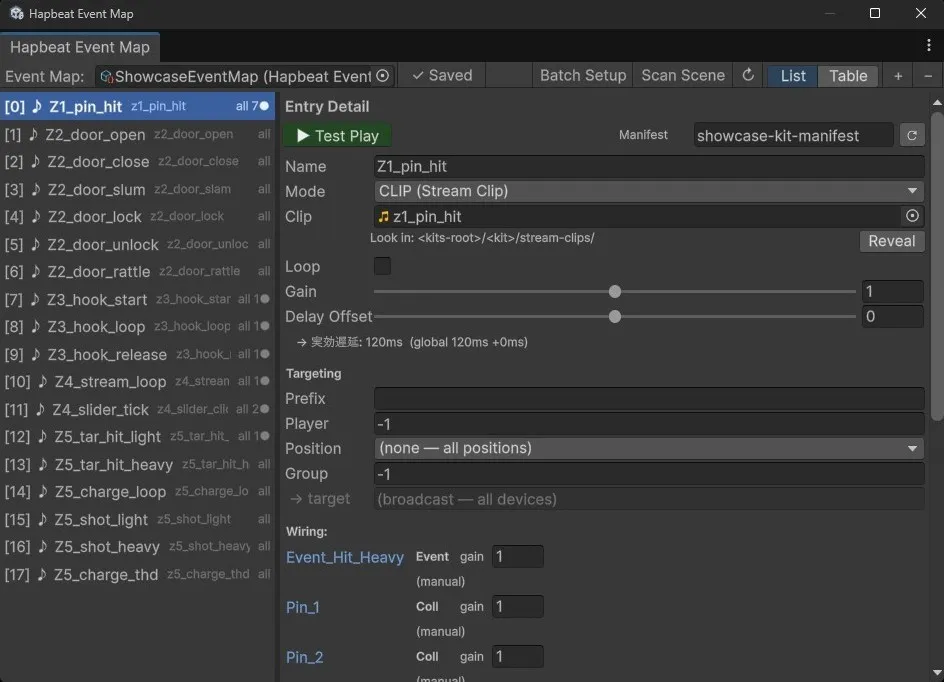
EventMap は Event ID と触覚エントリの対応関係を一括管理する ScriptableObject + 専用 Editor ウィンドウです。Trigger / StateBehaviour / スクリプトはすべて EventMap entry を参照し、エントリ側で mode・gain・target・bindings 等を一元定義します。
本ページは AI / 上級ユーザー向けの 網羅的 reference。読みやすさより漏れの無さを優先。タスク指向の使い方は プロジェクトに組み込む と Parameter Binding を参照。
1. 全体構造
Section titled “1. 全体構造”HapbeatEventMap (ScriptableObject; .asset)├─ entries : List<HapbeatEventEntry>└─ revertPlayModeChanges : bool
HapbeatEventEntry├─ _id (stable GUID, lazy-assigned)├─ mode (Command / StreamClip)├─ displayName / category / eventName (→ eventId = "category.eventName")├─ streamClip / loop (StreamClip mode)├─ bindings : List<HapbeatBindingPreset> (StreamClip mode)├─ gain├─ target├─ delayOffsetSeconds├─ notes├─ manifestOverride└─ _cachedManifestIntensity (HideInInspector)
HapbeatBindingPreset (entry.bindings の要素)├─ _id (stable GUID)├─ ownerObjectName├─ sourceTransformPath├─ sourceProperty, inputMin/Max├─ curveType, customCurve├─ outputParameter, outputMin/Max└─ debugLog, debugLogInterval, debugLogChangeThresholdエントリ間の参照は stable GUID (_id) で行うため、reorder / insert / delete / duplicate しても trigger 側の wiring は維持される。_id は初回 .id getter アクセス時に lazy-assign される。Editor は window 起動時 (EnsureEntryIdsAssigned) と entry 追加時に proactively 割り当てる。
2. HapbeatEventMap (asset 本体)
Section titled “2. HapbeatEventMap (asset 本体)”| フィールド | 型 | 説明 |
|---|---|---|
entries | List<HapbeatEventEntry> | エントリの並び。順序は表示順のみで wiring には影響しない |
revertPlayModeChanges | bool | true の場合、Play 中に行った EventMap 変更を Play 終了時に自動 revert(非破壊チューニング用) |
Asset 作成
Section titled “Asset 作成”| メニュー | 動作 |
|---|---|
Assets → Create → Hapbeat → Event Map | 右クリックフォルダ直下に asset 生成 |
Hapbeat → Create Event Map | Assets/HapbeatSDK/EventMaps/<scene-name>-EventMap.asset に生成 |
Hapbeat → Initial Scene Setup | Router GameObject + asset + window オープンを一括実行 |
Asset 作成後の .asset の場所はどこでも良いが、HapbeatSDK/EventMaps/ 配下が推奨。Initial Scene Setup は active scene 名を asset ファイル名に組み込む (<scene>-EventMap.asset)。
Public API (HapbeatEventMap クラス)
Section titled “Public API (HapbeatEventMap クラス)”| メソッド | 戻り値 | 用途 |
|---|---|---|
GetEntry(int index) | HapbeatEventEntry? | list index ベース(legacy、index 不安定なので非推奨) |
FindById(string id) | HapbeatEventEntry? | stable GUID 検索(推奨)。Trigger 側はこれを使う |
IndexOfId(string id) | int | GUID → list index(-1 if not found) |
FindByName(string displayName) | HapbeatEventEntry? | displayName 完全一致 |
FindByEventId(string eventId) | HapbeatEventEntry? | category.eventName 完全一致 |
GetDisplayNames() | string[] | エディタ dropdown 用。各行に [index] icon displayName 形式 |
3. HapbeatEventEntry 全フィールド
Section titled “3. HapbeatEventEntry 全フィールド”3.1 識別子
Section titled “3.1 識別子”| フィールド | 型 | 既定値 | 説明 |
|---|---|---|---|
_id | string (HideInInspector) | "" → lazy GUID | stable identifier。reorder / insert に強い。Trigger は _entryId でこれを保持 |
HasId (getter) | bool | — | .id getter が副作用なく評価できるか |
RegenerateId() | — | — | 強制再生成。Duplicate 時に使う |
3.2 Mode
Section titled “3.2 Mode”| フィールド | 型 | 既定値 | 説明 |
|---|---|---|---|
mode | HapticMode enum | Command | Command(device 内蔵 Kit clip を ID で再生)/ StreamClip(PCM を UDP 送信) |
UI 表示ラベルは s_ModeLabels:
FIRE (Command)CLIP (Stream Clip)
旧 LIVE (stream_source) モードは廃止済み。enum 名は API 互換のため Command / StreamClip のまま。
HapticMode.GetModeIcon() の出力
Section titled “HapticMode.GetModeIcon() の出力”| Mode | Icon (1 文字) | 備考 |
|---|---|---|
Command | > | FIRE |
StreamClip | ♪ (U+266A) | CLIP |
| (fallback) | ● (U+25CF) | 未知 enum value 用 |
3.3 識別 / 表示
Section titled “3.3 識別 / 表示”| フィールド | 型 | 用途 |
|---|---|---|
displayName | string | エディタ表示用ラベル(例: “Landing Impact”) |
category | string | event-id の前半。^[a-z][a-z0-9_-]{0,63}$ のセグメント形式 |
eventName | string | event-id の後半。同上のセグメント形式 |
eventId (computed) | string | "{category}.{eventName}"。category 空時は eventName のみ、eventName 空時は "" |
IsValidSegment(segment): ^[a-z][a-z0-9_-]{0,63}$ の正規表現で検証。
IsValid(): category + eventName 両方が valid segment。
3.4 StreamClip mode 専用
Section titled “3.4 StreamClip mode 専用”| フィールド | 型 | 既定値 | 説明 |
|---|---|---|---|
streamClip | AudioClip | null | UDP で送信する PCM16 source。HapbeatSDK/Kits/<kit>/stream-clips/ 配下推奨 |
loop | bool | false | true で Stop() まで再生継続。SequenceTrigger の hold phase / 連続 modulation 用 |
bindings | List<HapbeatBindingPreset> | empty | Parameter Binding preset の登録リスト |
streamClip 変更時、所属 Kit の *-manifest.json を manifestOverride に auto-attach する(同じ entry の _cachedManifestIntensity も refresh)。
3.5 Gain
Section titled “3.5 Gain”| フィールド | 型 | 範囲 | 説明 |
|---|---|---|---|
gain | float | [0, 2] (Range attribute) | master gain。GetEffectiveGain() = gain × _cachedManifestIntensity |
3.6 Targeting
Section titled “3.6 Targeting”| フィールド | 型 | 例 |
|---|---|---|
target | string | ""(全デバイス) / player_1 / */pos_neck / player_1/pos_chest / team_red/player_1/pos_chest/group_3 |
HasTarget (getter): !string.IsNullOrEmpty(target)。
StandardPositions 定数
Section titled “StandardPositions 定数”contracts の device-addressing spec に準拠した body position 12 種:
pos_neck, pos_chest, pos_abd,pos_l_arm, pos_r_arm, pos_l_wrist, pos_r_wrist,pos_hip, pos_l_thigh, pos_r_thigh, pos_l_ankle, pos_r_ankle対応する PositionLabels:
Neck, Chest, Abdomen,Left Arm, Right Arm, Left Wrist, Right Wrist,Hip, Left Thigh, Right Thigh, Left Ankle, Right AnkleBuildTarget(int player = -1, string position = null)
Section titled “BuildTarget(int player = -1, string position = null)”target 文字列を組み立てる static ヘルパー:
| player | position | 戻り値 |
|---|---|---|
> 0 | non-empty | player_<N>/<position> |
> 0 | null/empty | player_<N> |
-1 | non-empty | */<position> |
-1 | null/empty | ""(全デバイス) |
window UI ではさらに Prefix (例: team_red) と Group (group_<N> suffix) を加えて 4 セグメント (prefix/player_N/position/group_N) を構築できる。
3.7 Latency offset
Section titled “3.7 Latency offset”| フィールド | 型 | 範囲 | 説明 |
|---|---|---|---|
delayOffsetSeconds | float | [-0.2, 0.2] (Range) | per-entry オフセット。global (HapbeatConfig.hapticDelaySeconds) と加算され、max(0, global + offset) が実 delay |
UI に effective delay を ms 単位で readout 表示。
3.8 Notes / メタ
Section titled “3.8 Notes / メタ”| フィールド | 型 | 説明 |
|---|---|---|
notes | string (TextArea 1-3 行) | デザイナーメモ。device には送られない |
manifestOverride | TextAsset | 特定 <kit-name>-manifest.json を強制参照。未設定なら auto-resolve (clip path → eventId match) |
_cachedManifestIntensity | float (HideInInspector) | manifest から resolve した intensity 値。-1f は “未解決”、0..1 は authored 値 |
CachedManifestIntensity (getter): 読み取り専用 accessor。
SetCachedManifestIntensity(float): Editor-only setter (duplicate 時の cache 伝搬等)。
3.9 派生メソッド
Section titled “3.9 派生メソッド”| メソッド | 戻り値 | 説明 |
|---|---|---|
GetEffectiveGain() | float | _cachedManifestIntensity < 0 ? gain : gain × _cachedManifestIntensity。intensity=0 は honored (silence) |
GetSummary() | string | List 表示用要約。StreamClip → streamClip.name、Command → eventId |
GetModeIcon() | string | > / ♪ / ● |
4. HapbeatBindingPreset 全フィールド
Section titled “4. HapbeatBindingPreset 全フィールド”HapbeatEventEntry.bindings の要素。StreamClip 再生中に gain / pan を modulate するための preset。
| フィールド | 型 | 既定値 | 説明 |
|---|---|---|---|
_id | string (HideInInspector) | "" → lazy GUID | stable identifier。runtime の HapbeatParameterBinding._linkedBindingId から参照される |
ownerObjectName | string | "" | binding の scope。空 = shared (全 wired GO に適用) / 非空 = 指定 GameObject 名にのみ適用 |
sourceTransformPath | string | "" | trigger root からの相対 path。空 or . = trigger 自身 |
sourceProperty | BindingSourceProperty enum | LocalPositionY | 入力ソース種別 |
inputMin | float | 0 | 入力レンジ下端 → outputMin にマップ |
inputMax | float | 1 | 入力レンジ上端 → outputMax にマップ |
curveType | BindingCurveType enum | Linear | normalize 後の curve |
customCurve | AnimationCurve | Linear(0,0)-(1,1) | curveType=Custom のとき |
outputParameter | BindingOutputParameter enum | StreamGain | modulate 対象 |
outputMin | float | 0 | 出力下端 |
outputMax | float | 1 | 出力上端 |
debugLog | bool | false | per-frame debug log の on/off |
debugLogInterval | float | 0.1 | log throttle (秒) |
debugLogChangeThreshold | float | 0.02 | 正規化値がこれ以上動かないと log を出さない |
4.1 BindingSourceProperty (10 値)
Section titled “4.1 BindingSourceProperty (10 値)”| 値 | 入力 | 必要 ref |
|---|---|---|
LocalPositionX / Y / Z | _sourceTransform.localPosition.{x,y,z} | _sourceTransform |
LocalScaleX / Y / Z | _sourceTransform.localScale.{x,y,z} | _sourceTransform |
VelocityMagnitude | Rigidbody.linearVelocity.magnitude (Unity 6+) or .velocity.magnitude | _sourceTransform 上の Rigidbody |
AngularVelocityMagnitude | Rigidbody.angularVelocity.magnitude | 同上 |
PositionDeltaMagnitude | (pos - prevPos).magnitude / Time.deltaTime。Kinematic / XRGrab 用 | _sourceTransform |
SliderValue | Slider.value | _sourceSlider |
External | binding.SetValue(v) で外部 push | なし |
4.2 BindingCurveType (5 値)
Section titled “4.2 BindingCurveType (5 値)”| 値 | 数式 |
|---|---|
Linear | t |
EaseIn | t² |
EaseOut | 1 - (1-t)² |
Exponential | (e^(3t) - 1) / (e^3 - 1) |
Custom | customCurve.Evaluate(t) |
4.3 BindingOutputParameter (2 値)
Section titled “4.3 BindingOutputParameter (2 値)”| 値 | 範囲 | 効果 |
|---|---|---|
StreamGain | 0..2 (clamped) | playback.ApplyGainModulation(output)。entry.gain × manifest.intensity × bindingOutput の最終段 |
StreamPan | -1..+1 | playback.Pan = output。equal-power pan law。mono clip では無視 |
5. EventMap ウィンドウ
Section titled “5. EventMap ウィンドウ”5.1 起動
Section titled “5.1 起動”- メニュー:
Hapbeat → Open Event Map(SDK menu 旧名:Hapbeat → Event Map) - 内部実装:
HapbeatEventMapWindow : EditorWindow - 最小サイズ: 500 × 300
- Tab タイトル:
Hapbeat Event Map(未保存時は末尾に*)
5.2 永続設定 (EditorPrefs)
Section titled “5.2 永続設定 (EditorPrefs)”| Key | 内容 |
|---|---|
HapbeatEventMap_SelectedGUID | 直近選択された EventMap asset の GUID |
HapbeatEventMap_SplitRatio | List view の左右ペイン分割比 (0.2 .. 0.8、デフォルト 0.42) |
HapbeatEventMap_ViewMode | 0 = List / 1 = Table |
5.3 Auto-save / Dirty 管理
Section titled “5.3 Auto-save / Dirty 管理”- 編集ごとに
EditorUtility.SetDirty+AssetDatabase.SaveAssetIfDirtyを実行 OnLostFocus/OnDisableでも保存(domain reload / Unity 終了で edit が失われないように)- toolbar に
● Save(orange) /✓ Savedの indicator
5.4 Toolbar
Section titled “5.4 Toolbar”横一列、左から:
| 要素 | 機能 |
|---|---|
Event Map: Object Field | 編集対象 EventMap を切替(GUID で persist) |
● Save / ✓ Saved | dirty 状態と手動保存ボタン |
| (FlexibleSpace) | |
Batch Setup | HapbeatBatchSetupWindow を開く |
Scan Scene | scene 内 Trigger / State / Script wiring を再スキャン |
↻ | manifest intensity cache を全 entry 分 refresh |
List / Table (segmented) | view mode 切替 |
+ | 新規 entry 追加(直前 entry の mode を継承) |
− | 選択中 entry を削除 |
5.5 キーボード操作
Section titled “5.5 キーボード操作”| キー | 動作 |
|---|---|
↑ / ↓ | 選択 entry 移動 |
Esc | 進行中の drag-reorder をキャンセル |
6. List view
Section titled “6. List view”6.1 構成
Section titled “6.1 構成”- 左ペイン: entry 一覧(行ごとに mode icon + displayName + summary)
- スプリッタ (4px 幅) — ドラッグでペイン比変更
- 右ペイン: 選択 entry の詳細編集
6.2 行操作 (左ペイン)
Section titled “6.2 行操作 (左ペイン)”| 操作 | 動作 |
|---|---|
| 左クリック | 選択 |
ドラッグハンドル (☰) を 10px 超ドラッグ | 順序変更。GUID 参照なので wiring は保持される |
| 右クリック | context menu (下記) |
6.3 行 context menu (単一選択時)
Section titled “6.3 行 context menu (単一選択時)”- Copy Entry Values / Paste Entry Values(clipboard 経由、binding preset id は再生成)
- Add Entry Above / Below
- Duplicate Entry(GUID 再生成)
- Delete Entry
6.4 右ペイン: Entry Detail
Section titled “6.4 右ペイン: Entry Detail”順に描画される UI:
- Test Play Bar(次節 §6.5)
- Name —
displayNameの TextField - Mode —
FIRE (Command)/CLIP (Stream Clip)popup - Mode 別フィールド:
- Command: Category / EventName(segment validation)+ Kit eventId dropdown(
HapbeatSDK/Kits/<category>/<category>-manifest.jsonから候補列挙) - StreamClip:
Clip(AudioClip) + Kit folder hint (stream-clips/) +Looptoggle
- Command: Category / EventName(segment validation)+ Kit eventId dropdown(
- Gain — 0..2 slider
- Delay Offset (s) — −0.2..+0.2 slider + effective delay readout (ms)
- Targeting セクション:
PrefixTextField (optionalteam_red等)PlayerIntField (1..99 / -1)PositionPopup (12 標準 + “(none)”)GroupIntField (1..99 / -1)- →
target自動構築 + read-only preview
- Wiring セクション(§7.1)
- State Wiring セクション(§7.2)
- Script Wiring セクション(§7.3)
- Parameter Bindings セクション(StreamClip のみ; §8)
- Notes — TextArea
6.5 Test Play Bar
Section titled “6.5 Test Play Bar”- ボタン:
▶ Test Play(green) ⇔■ Stop(red) の toggle- Play 中:
HapbeatManager.Instance経由 - Edit 中:
HapbeatEditorTransportを lazy open
- Play 中:
- 右側: Manifest 行(
Hapbeat → Open Settingsで設定するHapbeatConfigの port/group を使う)- Label
Manifest - Picker (
*-manifest.json限定 TextAsset field) —manifestOverrideを設定 ↻Refresh ボタン — clip の所属フォルダを walk up して*-manifest.jsonを auto-attach
- Label
- inline hint: 接続未確立 / missing intensity warning / streaming indicator
- パネル幅 < 260px で compact mode(label 省略)
7. 自動 Wiring スキャン
Section titled “7. 自動 Wiring スキャン”Trigger / State / Script の 3 種について、scene および AnimatorController asset を walk して どの entry が誰から発火されているか を逆引き表示する。Scan Scene ボタンで明示再スキャン。EditorApplication.delayCall で再スキャンが要求されるケース(destroyed object 検出など)あり。
7.1 Trigger Wiring (TriggerInfo)
Section titled “7.1 Trigger Wiring (TriggerInfo)”scene 内の全 HapbeatTriggerBase を walk:
| フィールド | 内容 |
|---|---|
trigger | component instance |
gameObjectName | display |
typeName | Coll / Seq / Tick / Event |
wiredEvents | UnityEvent reflection で接続元を列挙(例: XRGrabInteractable.selectEntered) |
Wiring セクションは GameObject 単位で grouping。各 GO 行に inline:
- GameObject link button (click で ping)
- type tag (
Coll/Seq/Tick/Event) gaininline editor (live scene component の_gainMultiplierを直接 RW)- TickEmitter のみ:
Δ(tick threshold) +axis(X/Y/Mag) inline editor
7.2 State Wiring (StateWiringInfo)
Section titled “7.2 State Wiring (StateWiringInfo)”HapbeatStateBehaviour を AnimatorController asset 上で列挙。scene 上で対応する Animator GO がいれば、その GO に紐づける(複数 GO で同 controller を共有可)。
| フィールド | 内容 |
|---|---|
behaviour | StateMachineBehaviour instance |
controller | AnimatorController asset |
layerName / stateName / phase | ”Enter” / “Exit” |
animatorObject | scene Animator GO(null = asset only) |
UI: GO 単位 grouping + State tag + gain editor。asset only entries は最後に “(Controllers without a scene Animator)” 見出しで列挙。
7.3 Script Wiring (ScriptWiringInfo)
Section titled “7.3 Script Wiring (ScriptWiringInfo)”非 Hapbeat MonoBehaviour の [SerializeField] string を walk し、値が displayName または eventId と完全一致するものを surfacing。
| フィールド | 内容 |
|---|---|
script | MonoBehaviour instance |
componentName | e.g. ChargeShooter |
fieldName | e.g. _eventName |
matchedValue | 文字列値 |
matchType | "displayName" or "eventId" |
heuristic なので false positive あり得る。
8. Parameter Bindings セクション (StreamClip mode のみ)
Section titled “8. Parameter Bindings セクション (StreamClip mode のみ)”エントリ右ペインの最下部、Notes の直前に表示。
8.1 グルーピング
Section titled “8.1 グルーピング”HapbeatBindingPreset.ownerObjectName で 3 種類に分類:
- wired GO 単位の foldout —
ownerObjectName == wiredGO.name。その GO の inline wiring と並べて表示 - Shared (all wired) —
ownerObjectName == ""。全 wired GO に attach される - Orphan groups —
ownerObjectNameが set されているが該当 GO が wiring 一覧に存在しない(rename / delete された GO の残骸)
8.2 各 preset 行で編集可能なフィールド
Section titled “8.2 各 preset 行で編集可能なフィールド”§4 の全フィールド + compact 表示用の expand/collapse。_id は HideInInspector だが内部で auto-assign される。
8.3 Sync Scene ボタン
Section titled “8.3 Sync Scene ボタン”SyncLinkedBindingsForEntry(entryIdx) を呼び、各 preset を対応する scene 上の trigger 子孫に HapbeatParameterBinding component として attach + link する(既存 link は維持)。(owner, sourceTransformPath, sourceProperty) のタプルが変わったら 自動で deferred sync も走る。
8.4 1:1 双方向同期
Section titled “8.4 1:1 双方向同期”- preset 削除 → window が link 中の全 scene
HapbeatParameterBindingをUndo.DestroyObjectImmediate(標準は EventMap = single source of truth) - scene 上の binding component 削除 →
HapbeatParameterBinding.OnDestroy+EditorApplication.delayCallでCleanupOrphanPresetを実行し、他に link 中の component がいなければ preset も map から除去 - どちらの方向も
Undo.RecordObject経由なので Ctrl+Z で一括 revert 可
9. Table view
Section titled “9. Table view”スプレッドシート形式の bulk 編集 view。
9.1 カラム
Section titled “9.1 カラム”| カラム | 内容 | 幅 |
|---|---|---|
☰ | drag handle | 20px |
# | list index | 28px |
Mode | popup (FIRE / CLIP / LIVE*) | 70px |
Name | displayName TextField | flex |
Event ID / Clip | Command: category.eventName 結合表示 / StreamClip: AudioClip picker | 180px |
Gain | FloatField | 48px |
Target | read-only summary | 110px |
× | delete | 20px |
*Table view の Mode popup には LIVE が残置されているが、enum 上の StreamClip 1 値しかないため LIVE 選択は no-op になる。
9.2 選択 / 一括編集
Section titled “9.2 選択 / 一括編集”| 操作 | 動作 |
|---|---|
| クリック | 単一選択 |
| Ctrl/Cmd + クリック | toggle multi-select |
| Shift + クリック | 範囲 multi-select |
| マルチセル状態でセル編集 | 同一カラムを全選択行に伝播(spreadsheet 風) |
9.3 行 context menu (multi-select 時)
Section titled “9.3 行 context menu (multi-select 時)”- Set Mode/FIRE (Command)
- Set Mode/CLIP (Stream Clip)
- Set Gain…/0.5 / 1.0 / 2.0
- Duplicate All
- Delete All
9.4 Empty state
Section titled “9.4 Empty state”エントリ 0 件のとき (empty — click + to add) を表示。
10. Manifest intensity の解決
Section titled “10. Manifest intensity の解決”HapbeatEventEntry._cachedManifestIntensity は Studio で deploy された Kit manifest の parameters.intensity 値をキャッシュする。Editor 時にのみ解決し、runtime は cache を読むのみ(device は manifest を見ず、SDK 側で gain × intensity を wire の gain として送る)。
10.1 解決順序
Section titled “10.1 解決順序”manifestOverride(TextAsset) が set されていればそれを使う- StreamClip mode かつ
streamClipあり → clip asset path から walk up して*-manifest.jsonを探す - Command mode →
HapbeatSDK/Kits/<category>/<category>-manifest.jsonを試行 - project 内全
*-manifest.jsonを scan して、events内のclipパス orevent_idが一致するものを探す
10.2 自動 refresh トリガー
Section titled “10.2 自動 refresh トリガー”| イベント | 動作 |
|---|---|
| streamClip 変更 | 該当 entry の manifestOverride を auto-attach + cache 更新 |
| category / eventName 変更 | cache 更新 |
↻ toolbar ボタン | HapbeatManifestIntensity.Invalidate() + 全 entry の cache 更新 |
| EventMap window 起動 / entries 変更 | RefreshIntensityCache() |
未解決のとき _cachedManifestIntensity = -1f。GetEffectiveGain() は -1 のとき gain のみ返す(intensity 乗算なし)。Test Play bar に “manifest intensity not found” warning を表示。
11. Play-mode snapshot / revert
Section titled “11. Play-mode snapshot / revert”HapbeatEventMapPlaySnapshot static class ([InitializeOnLoad]) が EditorApplication.playModeStateChanged を購読:
| 状態遷移 | 動作 |
|---|---|
ExitingEditMode | revertPlayModeChanges = true の全 EventMap を JSON snapshot |
EnteredEditMode | snapshot を保持している EventMap を restore |
snapshot は Dictionary<int instanceID, Snapshot{json, takenAt}> に保持。Play 1 サイクル分のみ有効。Play 中に toggle を false にすれば restore はスキップされる(編集が保持される)。
12. EventMap asset Inspector (HapbeatEventMapEditor)
Section titled “12. EventMap asset Inspector (HapbeatEventMapEditor)”.asset を Project window で選択したときの Inspector:
| セクション | 内容 |
|---|---|
Revert Play-mode changes on exit | revertPlayModeChanges toggle |
| 手動 Snapshot / Restore ボタン | toggle off でも明示 snapshot を取れる |
Export as Unity Package | EventMap + 参照 AudioClip を .unitypackage に bundle(portability) |
| entries collapsed by default | パフォーマンス対策。Hapbeat.EventMap.ShowEntriesInInspector EditorPrefs で persist |
labelWidth は narrow inspector でも長いラベルが切れないよう max(170, currentViewWidth × 0.55) で override。
13. Markdown export (HapbeatEventMapMarkdownExport)
Section titled “13. Markdown export (HapbeatEventMapMarkdownExport)”| メニュー | 動作 |
|---|---|
Hapbeat → Export Event Map (Selected) | Project ビューで選択中の 1 EventMap を <MapName>.md として asset 隣に出力 |
Hapbeat → Export Event Map (All in Project) | t:HapbeatEventMap で project 全 asset を一括 export |
出力フォーマット: 各 entry に ## <name> 見出し + メタ情報。AI への context 提供 / design doc 貼付け用途。
14. Drag-to-reorder の挙動
Section titled “14. Drag-to-reorder の挙動”- ハンドル (
☰カラム) からのみ drag 開始(編集セルを誤って動かさないため) - 10px の threshold 超で confirmed drag に promote
- blue ライン (
Color(0.3, 0.7, 1, 1), 2px) で drop position を可視化 - Esc キーで drag キャンセル
- 同位置 drop (
toSlot == fromorfrom + 1) は no-op - Trigger は GUID 参照なので reorder で wiring は壊れない
prefab asset 内にのみ存在し、scene にインスタンス化されていない trigger は scan 対象外。「rename / restructure 後に prefab を開いて再 wire」が必要なケースで warning を log。
15. Stable GUID と wiring の不変条件
Section titled “15. Stable GUID と wiring の不変条件”- Entry は
_id : stringを[SerializeField, HideInInspector]で保持し、最初の.idgetter 呼び出しでGuid.NewGuid().ToString("N")を生成 - Trigger は
_entryId : stringで参照(旧_entryIndexは v2.0 で削除済み、id 一本化) HapbeatBindingPreset._idも同様の GUID。HapbeatParameterBinding._linkedBindingIdと照合- Duplicate / clipboard paste 時は
RegenerateId()で新 GUID を割当(runtime の binding が複製元を指したまま残らないように) - 既存 scene の YAML に残った旧
_entryIndex値は load 時に未知 field として無視
16. Editor 関連メニュー一覧(EventMap 関連だけ抜粋)
Section titled “16. Editor 関連メニュー一覧(EventMap 関連だけ抜粋)”| メニューパス | priority | 効果 |
|---|---|---|
Hapbeat/Open Event Map | 10 | window を開く |
Hapbeat/Initial Scene Setup | 50 | folder + Router + EventMap asset + window を一括 |
Hapbeat/Create Event Router | 30 | scene に [Hapbeat Event Router] GO のみ |
Hapbeat/Create Event Map | 31 | asset のみ |
Hapbeat/Export Event Map (Selected) | 70 | Markdown 1 件 |
Hapbeat/Export Event Map (All in Project) | 71 | Markdown 全件 |
GameObject/Hapbeat/Event Router | 10 | hierarchy 右クリックメニューにも同コマンドを露出 |
Assets/Create/Hapbeat/Event Map | (CreateAssetMenu) | 右クリックフォルダ直下に asset 生成 |
17. 関連ページ
Section titled “17. 関連ページ”- プロジェクトに組み込む — 利用フロー
- Trigger コンポーネント — entry を参照する側
- Parameter Binding —
bindings[]の使い方 - Editor メニュー一覧 — メニュー全体の俯瞰
- Fire と Clip — 使い分けと実装 —
modeの選び方